Next Steps after initial SNAP/EBT approval
SNAP Online for CSA programs
Congratulations on your SNAP/EBT approval! Once USDA's Food and Nutrition Agency (FNA) authorizes you as an Internet Retailer, a few setup steps stand between you and taking SNAP Online orders. The flow below shows exactly what happens next.
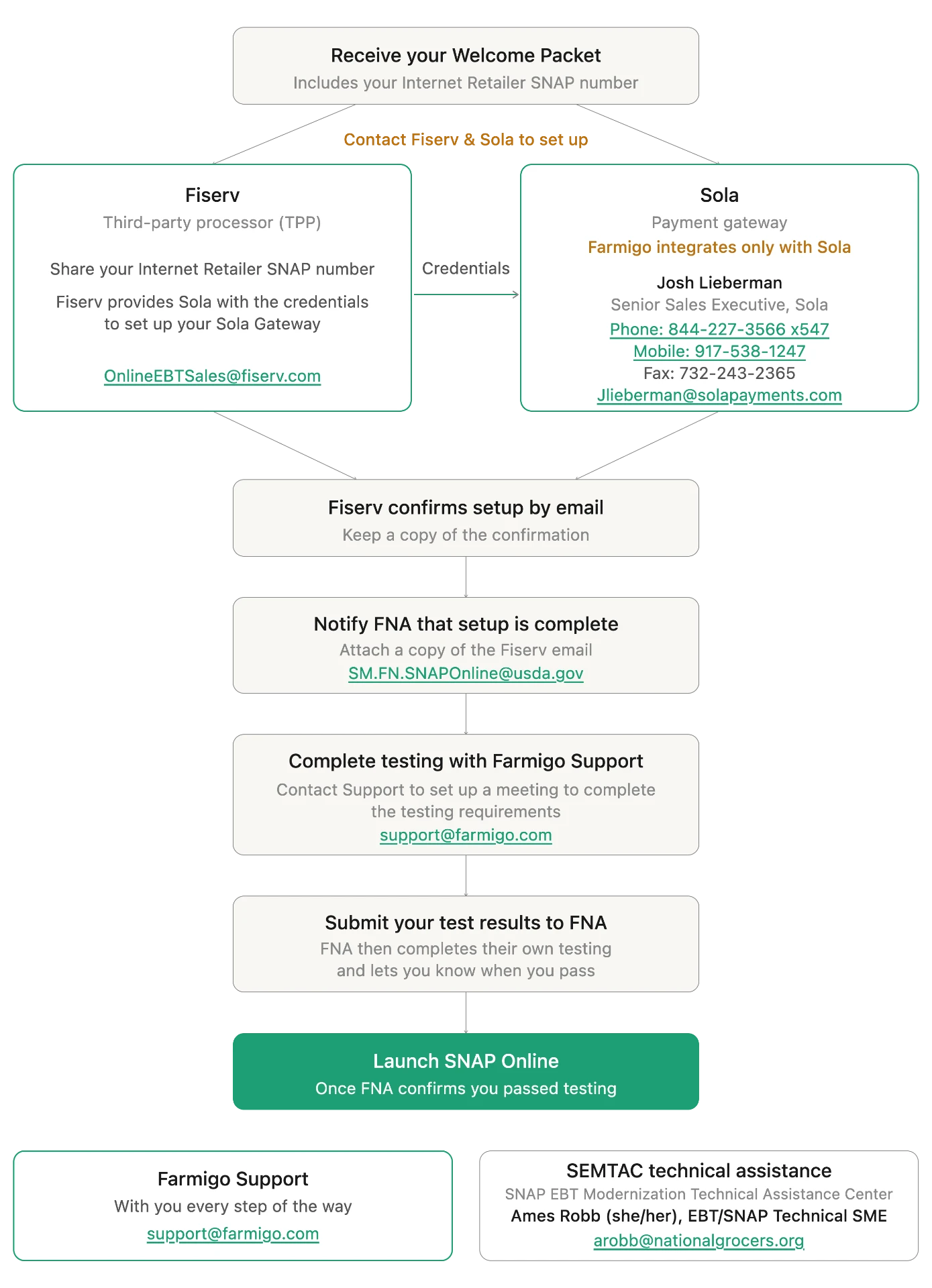
What happens at each step
- Receive your Welcome Packet. It includes your Internet Retailer SNAP number.
- Contact Fiserv & Sola to set up. Fiserv is the third-party processor (TPP). Share your Internet Retailer SNAP number with OnlineEBTSales@fiserv.com — Fiserv then provides Sola with the credentials to set up your Sola Gateway.
- Work with Sola, the payment gateway — Farmigo integrates only with Sola. Your contact is Josh Lieberman, Senior Sales Executive: phone 844-227-3566 x547, mobile 917-538-1247, fax 732-243-2365, or jlieberman@solarpayments.com.
- Fiserv confirms setup by email. Keep a copy of the confirmation.
- Notify FNA that setup is complete. Email SM.FN.SNAPOnline@usda.gov and attach a copy of the Fiserv email.
- Complete testing with Farmigo Support. Contact support@farmigo.com to set up a meeting to complete the testing requirements.
- Submit your test results to FNA. FNA then completes their own testing and lets you know when you pass.
- Launch SNAP Online. Once FNA confirms you passed testing, your members can pay with SNAP EBT online!
Need help along the way?
SNAP Online support only
SEMTAC — SNAP EBT Modernization Technical Assistance Center
Ames Robb (she/her), EBT/SNAP Technical SME
Not approved yet? Start with How to apply to accept SNAP payments with Farmigo.
Did this article answer your question?
You might also find these helpful
Still have questions?
Our support team is here.