Projected Deposits Report
- Found under the Accounting section of the Reports page, the Projected Deposits report shows your program's future cash flow by month for the date range that you select.
- This report is used by Seasonal programs that offer installment plans. Year-round (i.e. ongoing) programs will not find this report useful because members are charged when their account balances run low, not according to scheduled future dates.
What are the Data Filters?
DATE RANGE:
- You may select a single delivery day or a range of dates.
- The date corresponds to the "Date" column from the payments listed under a member account. The report will show monthly totals.
- The report will only include future delivery dates.
- It will include future pending payments for all seasons.
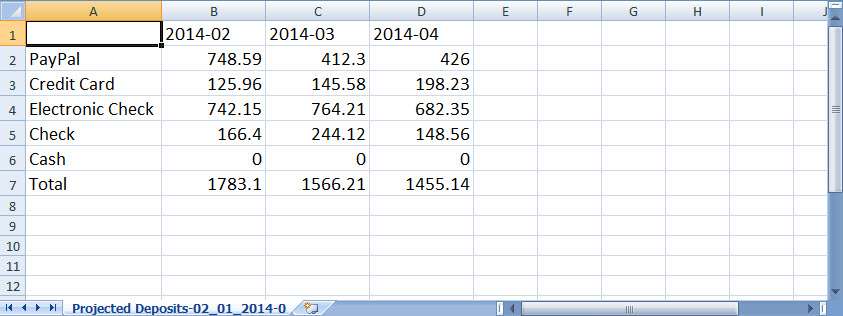
What does the report look like?
The report is generated as a CSV file, which is readable in most spreadsheet software programs, such as Microsoft Excel. The data is broken down by payment type and by month.
Did this article answer your question?
You might also find these helpful
Still have questions?
Our support team is here.